





Fanvil i67 Face Recognition Door Phone
KSh 55,000.00
Fanvil i67 Face Recognition Door Phone
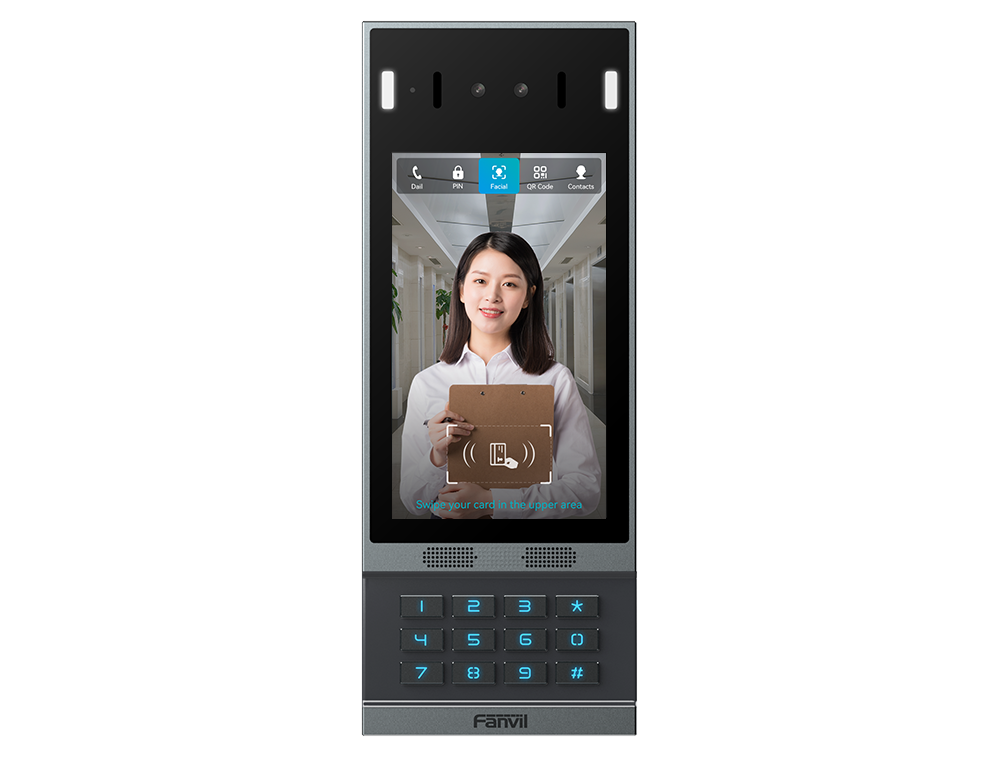
The Fanvil i67 Face Recognition Door Phone is a touchscreen entrance terminal for residential and commercial properties. It combines facial identification, visitor intercom, and access control in one device. Moreover, its 7-inch IPS touchscreen provides a spacious interface for directories, calling, and credential entry. It suits residential communities, apartments, hotels, and office buildings.
Interactive 7-Inch Touchscreen
The 7-inch IPS touchscreen has a resolution of 600 × 1024 pixels. Therefore, visitors receive a clear interface for selecting contacts, making calls, and following access prompts.
Unlike a door phone that relies only on physical controls, the i67 supports direct touchscreen interaction. Its 12-key numeric panel also allows visitors to enter configured PINs or contact details. Consequently, properties can offer a structured entrance experience without installing a separate directory panel.
Contactless Facial Recognition
High-precision facial recognition verifies registered users at the entrance. As a result, authorised residents or employees can access the property without touching the screen or presenting a card.
The system stores up to 10,000 face profiles. Moreover, anti-spoofing liveness detection checks for attempts involving photographs, recorded videos, or masks. This process adds another verification layer to facial access.
However, biometric performance depends on correct enrolment, camera positioning, lighting, and system configuration. Administrators should therefore maintain accurate records and provide approved alternative entry methods.
Dual-Lens Entrance Camera
A dual-lens 2-megapixel camera captures entrance video. Automatic illumination also supports operation in changing light conditions. In addition, infrared or white-light assistance improves visibility when ambient lighting is limited.
The camera offers a 65-degree horizontal, 40-degree vertical, and 73-degree diagonal field of view. Therefore, installers should position the terminal where approaching users appear clearly within the recognition area.
Flexible Access Methods
The Fanvil i67 Face Recognition Door Phone supports different credentials for permanent users, staff, and approved visitors. Administrators can assign access rights according to the property’s operating requirements.
Supported methods include:
- Facial recognition
- IC or ID card
- PIN code
- QR code
- Remote DTMF code
- Compatible mobile application
- Connected indoor door-release control
The terminal stores up to 10,000 cards. Meanwhile, QR codes can support suitable visitor-access workflows when used with a compatible management system.
Key Features
- 7-inch IPS touchscreen with 600 × 1024 resolution.
- High-precision facial recognition for contactless access.
- Capacity for up to 10,000 registered faces.
- Capacity for up to 10,000 access cards.
- Liveness detection for photographs, videos, and masks.
- Dual-lens 2-megapixel camera with automatic illumination.
- Twelve-key numeric panel for PINs and calling.
- Full-duplex HD audio and video communication.
- Intelligent background-noise reduction.
- SIP 2.0 support over UDP, TCP, or TLS.
- ONVIF Profile S compatibility.
- Built-in relay and tamper alarm.
- IP66 and IK07 protection ratings.
- IEEE 802.3at PoE or 12V DC power.
- Wall or optional flush mounting.
Visitor Communication
Visitors can make audio and video calls to compatible IP phones, indoor stations, or mobile applications. Therefore, residents and staff can communicate with callers before deciding whether to release the entrance.
Full-duplex HD audio allows both parties to speak naturally. Furthermore, intelligent noise reduction helps limit distracting sounds around busy entrances.
SIP compatibility supports integration with suitable IP communication systems. Meanwhile, ONVIF Profile S allows the camera to work with compatible video-management equipment. Available features depend on the complete system configuration.
Access and Security Interfaces
The terminal provides three short-circuit inputs and two short-circuit outputs. In addition, a Wiegand interface supports compatible access controllers. A reserved RS-485 connection is also available for supported integration projects.
Motion detection and a gravity-sensing tamper alarm provide additional event information. Moreover, the built-in relay can operate within a correctly designed door-control system.
The complete installation requires suitable locks, controllers, power equipment, and network infrastructure. Therefore, a qualified installer should confirm all wiring and compatibility requirements.
Outdoor Installation
The aluminium-alloy housing carries IP66 and IK07 ratings. Consequently, it offers protection against dust, water, and defined mechanical impacts when correctly installed.
The Fanvil i67 Face Recognition Door Phone supports standard wall mounting. Alternatively, installers can use the separately available EX103 bracket for a flush-mounted finish. Power comes through IEEE 802.3at Class 4 PoE or a 12V DC, 2A input.
Why Choose the Fanvil i67 Face Recognition Door Phone?
The i67 provides a large touchscreen for properties that need a clear visitor interface. Its facial recognition and credential capacity also support high-user installations.
Moreover, multiple entry options allow administrators to serve residents, employees, service providers, and temporary visitors. SIP, ONVIF, Wiegand, and contact interfaces provide further integration flexibility. Overall, the device combines access management, visitor calling, and entrance video in one outdoor-rated terminal.
Frequently Asked Questions
How can visitors find and call the correct resident or department?
The touchscreen can present the calling interface configured by the administrator. Visitors can select or enter the required destination and begin an audio or video call through the connected SIP system.
What is the induction-loop line output used for?
The line output allows connection to a compatible induction-loop system. This setup can help users with suitable hearing devices receive intercom audio more clearly.
How does the tamper alarm respond to interference?
A gravity sensor can detect movement associated with tampering and generate an alarm event. The resulting notification or action depends on the connected platform and system configuration.
What is required for flush mounting?
Flush installation requires the separately available EX103 bracket and a prepared mounting area. Installers should also plan the network, power, lock, and control wiring before fitting the terminal.
Be the first to review “Fanvil i67 Face Recognition Door Phone”
Related products
IP Phones
IP Phones


Business IP Phones
IP Phones

Business IP Phones
Business IP Phones
IP Phones

IP Phones
Reviews
There are no reviews yet.